It is 11:17 PM. A single fiber degrades on an edge router, and within seconds your console lights up: an optical power alarm, two interfaces down, a service outage, and a traffic spike on the neighboring link that just absorbed the rerouted load. Five alarms, one actual problem. Multiply that across a busy network and you have the two challenges every on-call engineer knows well: too much noise, and too little time to work out what is actually wrong.
OpenNMS ALEC, the Architecture for Learning Enabled Correlation, has always tackled the first challenge by correlating related alarms into a single situation. Today we are bringing Large Language Models to bear on both challenges, with two new capabilities that work together to drive down Mean Time to Repair. And because AI decisions are never one-size-fits-all, you choose the model and where it runs.
Cutting the noise, with reasoning instead of distance
ALEC has historically grouped alarms using DBSCAN clustering, which measures the distance between alarms in time and network topology and groups the close ones together. It is fast, deterministic, and battle tested. It is also still here, fully supported, and still the default.
DBSCAN doesn't understand what an alarm means though. Distance is a good proxy for relatedness, but it is only a proxy. Two alarms can be close in time and topology without sharing a cause.
We’ve now added a second option: LLM-based correlation. Instead of a distance formula, ALEC hands the current set of active alarms, together with the network topology graph, to your configured model and asks it to reason about which alarms share a common underlying cause. A single upstream failure that produces a dozen downstream symptom alarms gets recognized as one situation, the way a seasoned engineer would see it. Isolated alarms with no clear relationship are left on their own rather than force-fit into a group.
The practical result is fewer, better-formed situations. This translates to less noise for your team to wade through.
You stay in control of the trade-offs. You decide how often ALEC re-clusters, anywhere from every minute to every hour, trading freshness against token usage. You can leverage our default prompt or add context for your network conventions and policies.
As this is a new approach, we have labeled it Experimental while it matures and we gather feedback. LLM output is not deterministic, so the same alarm set can group slightly differently between cycles. DBSCAN remains the default and is there whenever you want deterministic behavior.
Getting to the cause, not just the cluster
Grouping alarms tells you what is related but not why it happened and what to do about it. That is the second capability we are introducing: LLM based root cause analysis.
When a situation is created by either correlation engine, ALEC can ask an LLM to reason about the whole alarm cluster and return up to three probable root causes and resolutions on the situation's new AI Suggestions tab.
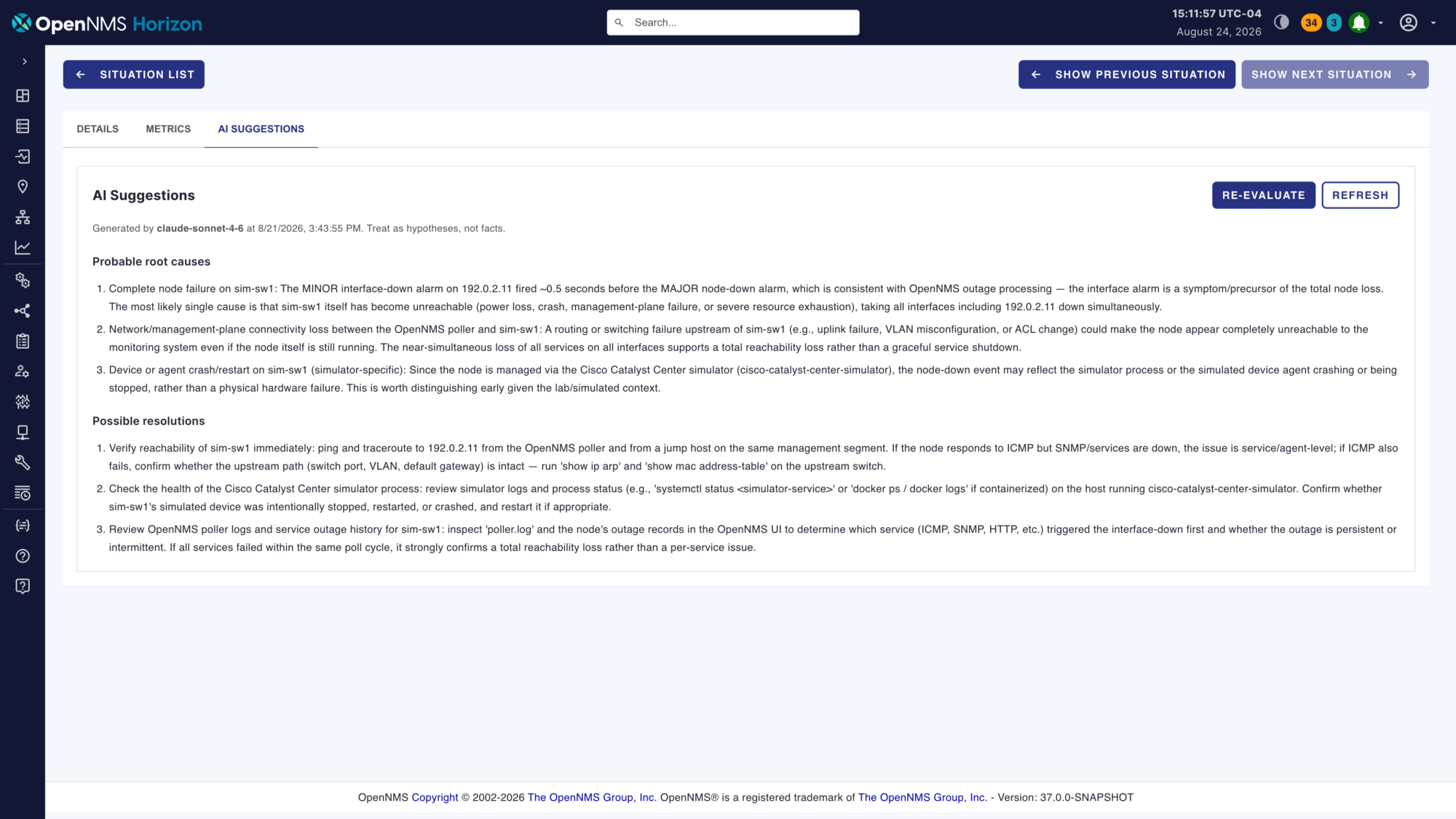
The recommendations can can go beyond generic "check your cables" messages. They reference the specific interfaces, thresholds, and commands an engineer should run first. This is designed to take you from a summary to a starting point.
Every analysis is clearly labeled with the model that produced it, when it ran, and a standing reminder: treat these as hypotheses, not facts. Analysis can run automatically on every new situation so suggestions are waiting when your engineer opens it, or on demand when you want tighter control over cost.
Bring your own LLM, cloud or fully local
ALEC talks to any endpoint that implements the OpenAI-compatible /chat/completions standard, including OpenRouter, OpenAI, Anthropic's API, Azure OpenAI, and local runtimes such as LM Studio, llama, and vLLM.
Where to start
You can download ALEC for OpenNMS by going here: https://github.com/OpenNMS-Plugins/alec/releases/tag/v3.0.4
If you are already running ALEC, upgrade to version 3.0.4 or later and you will find three configuration tabs waiting: Correlation Engine, LLM Root Cause Analysis, and LLM Setup.
Both of these new features are opt-in and you’ll be able to utilize them once you turn them on.
We have put together a step-by-step setup guide that you can access below. It includes screenshots, guidance on controlling cost and privacy, and a troubleshooting section.
Less noise. Faster hypotheses. Lower MTTR. On the model you choose. We can't wait to hear what you think. Join the conversation on Mattermost, or send me an email.
Jump to section
About the Author: José Anés