This blog post is coming out on the heels of our recent post on where OpenNMS time series storage is headed — RRDtool, Newts, and Prometheus-compatible storage — so make sure you check that out first because we're going to build off of that for what is presented here.
We get a lot of folks that ask us about using OpenNMS to monitor their VMware infrastructure and use VMware as a way to populate OpenNMS nodes. We provide both capabilities out of the box. In this post, I'm going to talk about one specific application of the data we collect from VMware systems.
The "Too Many vCPUs" Problem
I had a colleague this week ask me if I was familiar with a long standing "bug" in VMware that if you assigned too many virtual CPUs to a system, it could slow down the VM. The thing my colleague was describing isn't really a bug but rather a symptom of an overprovisioned host system and comes from how scheduling virtual CPUs works on hypervisors.
All major hypervisors have the same core concept of scheduling and "over scheduling" when virtual CPUs are over-provisioned. A lot of it comes from how Symmetric Multiprocessing (SMP) works, the short explanation is that when a virtual machine has multiple virtual CPUs, it will sit and wait for multiple real cores to become available to schedule those virtual CPUs and run the operation.
The Metrics to Watch: CPU Ready and CPU Readiness
If you're a seasoned VMware operator, then you know the way to resolve this is to monitor a combination of CPU utilization on your guests along with the CPU Ready and CPU Readiness values. That's not to say that there aren't any other things you should monitor, but this is the starting point. From there it typically involves working with end users or customers to right-size their VMs, expand your clusters, or some combination of the two.
If you haven't spent much time staring at these two counters, the quick distinction is worth having: CPU Ready is the raw time a vCPU spent waiting to be scheduled on a physical core, while CPU Readiness is that same wait expressed as a percentage of the polling interval. The percentage is usually the more useful of the two day-to-day, since it reads consistently no matter how your polling is configured.
How OpenNMS Monitors These Values Out of the Box
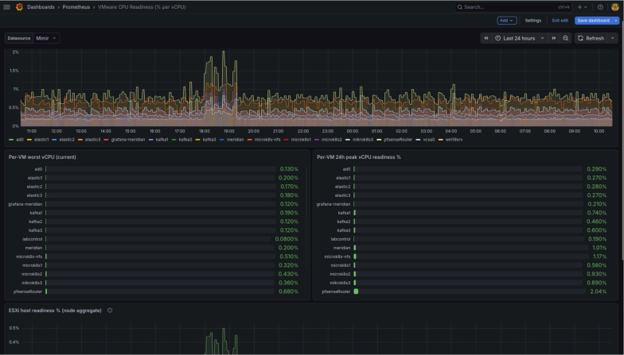
So, with all of that in mind, I thought it would be good to share that OpenNMS monitors these values out of the box with our VMware integration. You just need to turn it on and configure it for your VMware vCenter and ESXi hosts. Once you do, you can then start ingesting data into your OpenNMS instance, and if you're using the Prometheus RemoteWrite Plugin (the renamed Cortex plugin, which writes to any Prometheus remote-write compatible backend like Cortex, Mimir, Thanos, or VictoriaMetrics) then you can immediately start querying that data using PromQL in something like Grafana or you can create your own custom Graph Collections in OpenNMS.
For my lab, I've got things wired up with Prometheus, so my graph ended up looking a bit like this:
Setting Thresholds: When Should You Worry?
A good rule of thumb that I used to follow was that if the Readiness value was frequently breaching 5% or more then it was time to evaluate options for right-sizing the VM or upgrading the hosts. If it was above 10%, then there were real problems.
Setting Up Thresholds and Alarms in OpenNMS Meridian
So can we use those values to setup thresholding rules in OpenNMS Meridian and then get alarms when we breach them?!?! YES!!!! Below you'll find a link to a gist with the configs in it for the dashboard and the thresholds (and a bonus custom OpenNMS graph):
👉 https://gist.github.com/marshallmassengill/6b4c6dcbac33afb63159c00afb0b9600
I haven't done much testing with the thresholds and alarms given this is a lab, but the pieces should be there for others to see and understand. Hopefully, it will be helpful for you!
Frequently Asked Questions
Does OpenNMS monitor VMware CPU Ready and CPU Readiness natively? Yes. The VMware integration in OpenNMS collects CPU Ready and CPU Readiness metrics from vCenter and ESXi hosts without requiring custom polling configuration. You enable the integration and configure your credentials.
Can I set alerts for VMware CPU Readiness in OpenNMS? Yes. OpenNMS Meridian supports threshold-based alarms on any collected metric. You can define rules that trigger alarms when CPU Readiness exceeds defined thresholds (e.g., 5% or 10%) and route those alarms through your standard notification workflows.
How do I visualize VMware CPU Readiness in Grafana with OpenNMS? If you're using the OpenNMS Prometheus RemoteWrite Plugin (formerly the Cortex plugin) to store data in a Prometheus-compatible backend, the VMware performance data OpenNMS collects can be queried via PromQL in Grafana. The GitHub gist linked above includes a dashboard for CPU Readiness visualization.
What's a normal CPU Readiness value for VMware? Generally, CPU Readiness values below 5% are considered acceptable. Sustained values above 5% indicate an overprovisioned host and warrant investigation. Values above 10% typically correlate with noticeable performance degradation in guest workloads.
A Personal Note — My Journey with VMware and Saying Goodbye to ESXi
I think a lot of folks know I used to work for VMware. I'm not shy about telling people. I spent the first couple decades of my IT career wrangling VMs in VMware environments (and having a lot of fun doing it). I even was known to carry around a version of this PDF with me to meetings at one point: https://www.actualtechmedia.com/wp-content/uploads/2013/11/demystifying-cpu-ready.pdf. There's also a white paper online somewhere from my days at IBM about how CPU Readiness and para-virtual hardware can have big impacts on performance testing.
I also spent time working for VMware's Global Professional Services group handling large scale migrations, automation and integration work, and more. I even wrote my fair share of Hands-on Labs (and spent far too many hours in Las Vegas and San Francisco being cold in convention centers), helped with certifications and trainings, and a lot of other fun stuff:
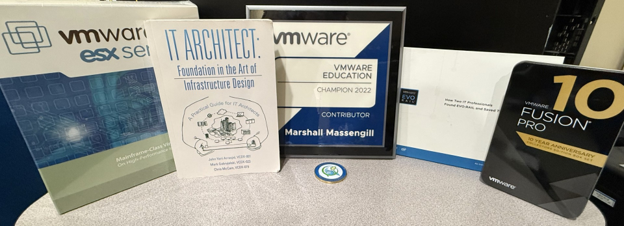
It's safe to say, I am a fan of VMware and my time spent on it has been great... so it's with a heavy heart that I'm about to say goodbye to ESXi in my homelab finally. With that in mind, this blog post is me saying goodbye to my homelab as it exists today and giving it one last real good use case to share with others.
Get Started with VMware Monitoring in OpenNMS
If you're running VMware infrastructure and want to get CPU Readiness monitoring and alerting set up, the VMware integration is available in OpenNMS Horizon and OpenNMS Meridian today. The GitHub gist above has everything you need to configure dashboards and thresholds. Questions about how OpenNMS fits into your monitoring environment? Contact the OpenNMS team or explore the documentation to get started.
Jump to section
About the Author: Marshall Massengill